User Admin Guide
Click a button below to view details.
Login
- Enter your username
- Enter your password
- Select 'Admin' from the role dropdown
- Click 'Sign In' to access your dashboard
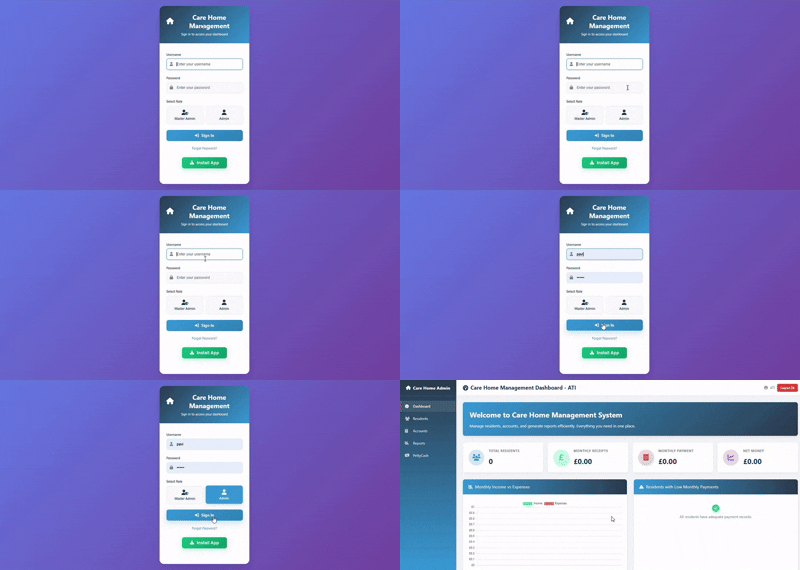
Login — How to sign in
Follow these steps to login as Master Admin:
- Open the login page.
- Enter your username.
- Enter your password.
- Select Admin from the role dropdown.
- Click Sign In to access your dashboard.
Dashboard
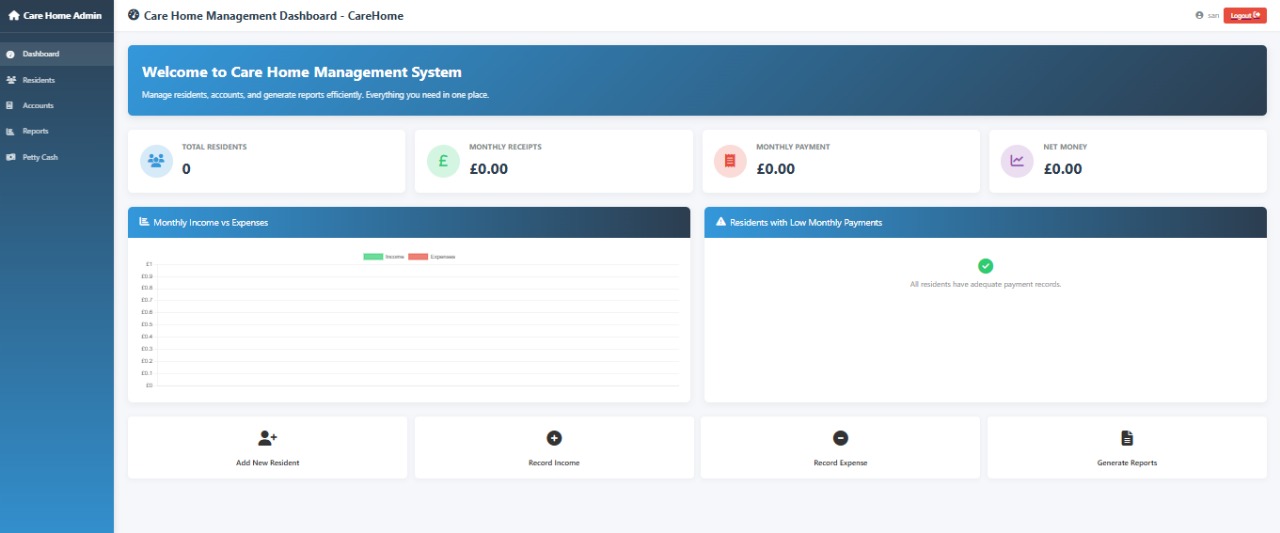
🏠 Care Home Admin Dashboard Overview
This dashboard provides a quick snapshot of the care home's operational and financial status, along with shortcuts to daily tasks.
1. Key Performance Indicators (KPIs) & Financial Snapshot
📊 Quick-View KPI Cards
- 👥 Total Residents – Shows the current number of residents (e.g., 0).
- 💰 Monthly Receipts – Displays total income received this month (e.g., £0.00).
- 💸 Monthly Payments – Shows all expenses paid this month (e.g., £0.00).
- 📉 Net Money – Calculates Receipts – Payments to show the monthly net balance (e.g., £0.00).
2. Financial Analysis
- 📈 Monthly Income vs Expenses Chart – A bar graph comparing Income (green) and Expenses (red) to quickly show profit or deficit.
- ⚠️ Residents with Low Monthly Payments – A green ✔️ with the message “All residents have adequate payment records” indicates everything is in order.
3. Quick Action Buttons
These buttons allow the administrator to perform common tasks instantly:
- ➕👤 Add New Resident – Opens the form to create a resident profile.
- ➕💵 Record Income – Opens the module to log new income.
- ➖💵 Record Expense – Opens the module to record a payment/expense.
- 📄 Generate Reports – Generates operational and financial reports for this care home.
Residents — Full Guide
👵 Adding a New Resident
Stage 1: Initiate the Process & Enter Personal Details
📂 Navigate to Resident Management
Click the Residents tab in the Care Home Admin sidebar.
➕👤 Start Adding a Resident
Click the Add Resident button to open the Add New Resident form.
📝 Enter Personal Information
- Title (optional): Select from dropdown (e.g., None)
- Last Name
- First Name
- Date of Birth (mm/dd/yyyy)
- NHS Number
- Gender (Male/Female/Other)
Stage 2: Enter Next of Kin, Contact & Medical Details
👨👩👦 Next of Kin (NOK) Details
- NOK Name
- NOK Email Address
- NOK Phone Number
- NOK Relationship (e.g., Son, Daughter, Spouse)
📞 Contact & Residence Details
- Phone Number
- Address
🩺 Medical Information
- Medical Conditions
- Current Medications
🏠 Admission Details
- Admission Date (mm/dd/yyyy)
- Room Number
Stage 3: Finalize the Entry
💾 Save Resident Profile
Click the blue Add Resident button to save and add the resident.
🔄 Reset if Needed
Click Reset Form to clear all data and start again.
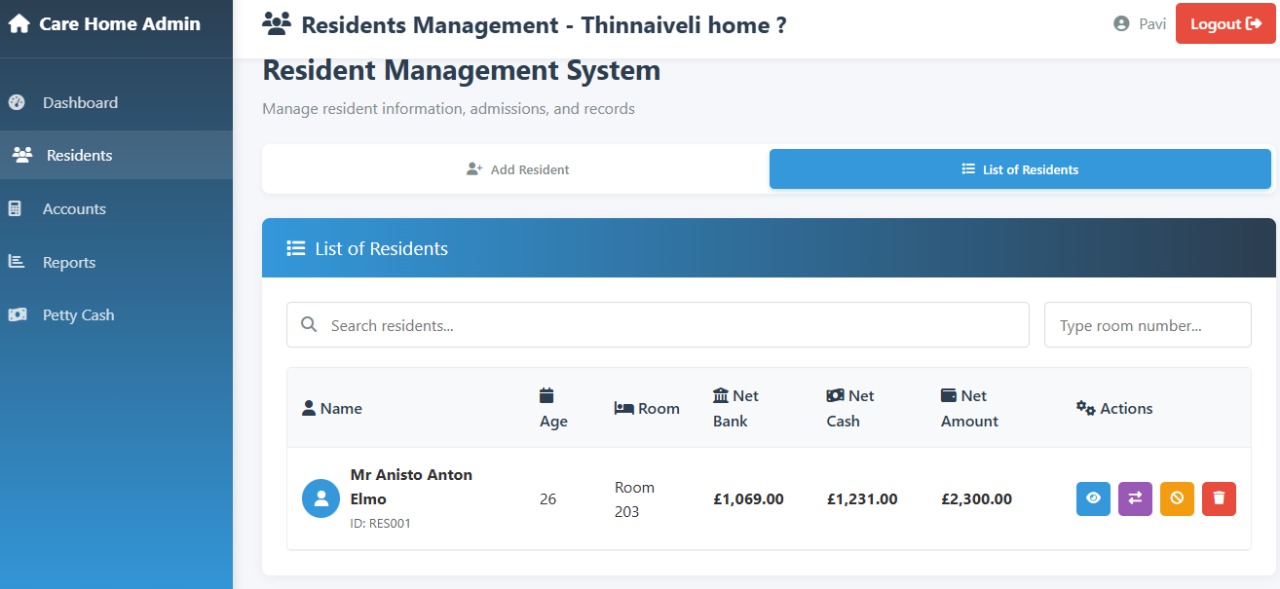
👵 Resident Management Actions (Web Care)
The Resident Management System lists all residents along with financial summaries and an Actions column containing five icons.
1. 🔵 View Resident Details (First Icon)
- Click View: Click the blue icon in the Actions column.
- Review Details: Pop-up shows Personal, Contact, and Residence information.
- Close: Click ❌ to return.
2. 🟧 Edit Resident Details (Second Icon)
- Click Edit: Click the orange icon.
- Modify Fields: Edit pop-up opens with prefilled details.
- Save Changes: Click Save to update.
3. 🟣 View Transaction History (Third Icon)
- Click Transactions: Click the purple icon.
- View History: Pop-up lists financial activities.
- Filters: Filter by month, navigate using arrows.
- Columns: Date, Type, Description, Method, Amount, Balance, Reference, Created By.
- No Records: Message appears if no transactions exist.
- Close: Click Close to return.
4. 🟡 Deactivate Resident (Fourth Icon)
- Click Deactivate: Click the yellow icon.
- Confirm: System asks for confirmation.
- Finalize: Click Deactivate or Cancel.
5. 🔴 Delete Resident (Fifth Icon)
- Click Delete: Click the red trash icon.
- Confirm Warning: Shows irreversible deletion message.
- Finalize: Click Delete or Cancel.
Accounts — Full Finance Guide
💰 Add Money
- 👤 Enter Payer/Resident Name — Select the person/entity giving money.
- 🏦 Select Account — Where the money will be deposited.
- 📂 Select Category/Head — For accurate reporting.
- 📅 Enter Date — Defaults to today’s date (e.g., 22/11/2025).
- 💵 Enter Amount — Total received.
- 🔢 Enter Reference — Unique number/code for tracking.
- ✏️ Enter Description — Brief explanation of payment.
- ✅ Confirm Details — Review for accuracy.
- 💾 Add Money — Click blue button to save.
- 🔄 Reset Form (Optional) — Clear all fields.
Best Practice Tip: Always select correct Category/Head for accurate reports.
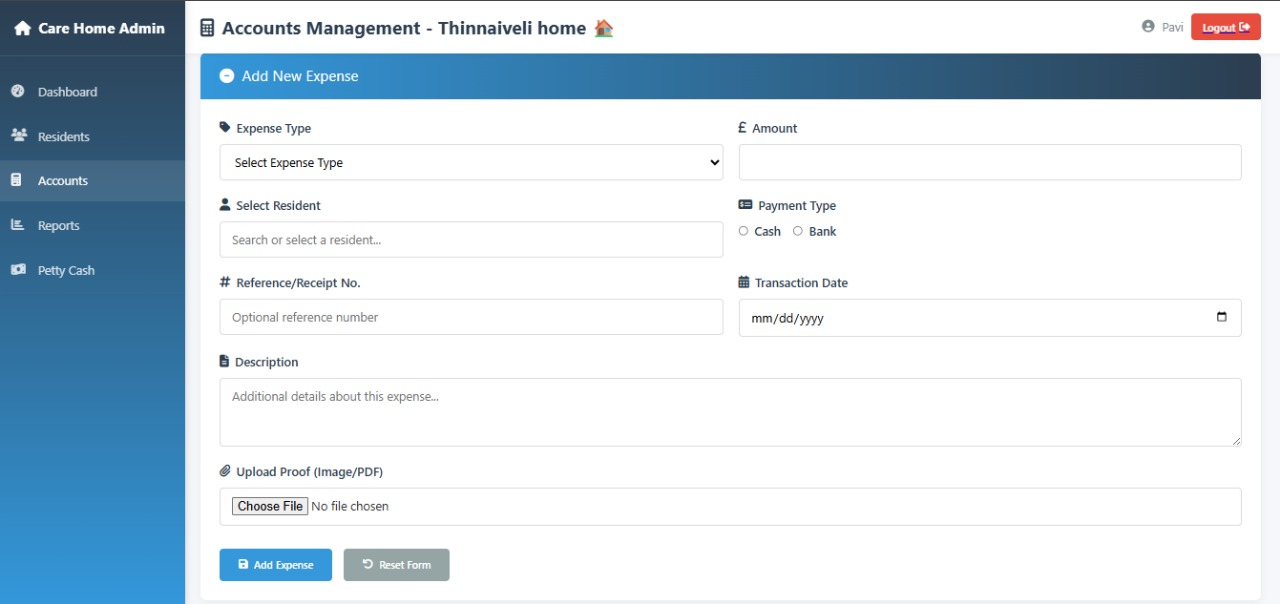
💸 Add an Expense
- 📝 Fill Expense Details — Type, Amount, Resident (optional), Payment Type, Reference, Date, Description, Upload Proof.
- ✅ Confirm and Save — Click Add Expense (Blue Button). Reset form if needed.
- 📊 Check Updates — Daily Transactions updates automatically.
⬇️ Paid Back / Drop
- 📝 Enter Drop Details — Drop Amount, Resident (optional), Reason, Payment Type, Reference, Date, Description, Upload Proof.
- ✅ Confirm and Save — Click Process Drop (Blue Button). Reset form if needed.
- 📊 Check Updates — Total Drops summary updates automatically.
🔄 Transfer Funds
- 📝 Fill Transfer Details — Amount, Resident (optional), Transfer Method, Reference, Date, Description.
- ✅ Confirm and Save — Click Process Transfer (Blue Button). Reset form if needed.
- 📊 Check Updates — Overall Bank & Cash Balances update automatically.
📅 Daily Transactions
- 📊 Check Key Summary Cards — Total Income, Expenses, Drops, Net Balance, Overall Bank/Cash Balance.
- 🗂️ View Transaction List — Table shows all transactions for the date range.
- ⚙️ Use Filters — By Date Range, Type, Resident.
- 🟦 Use Action Buttons — Add Money, Add Expense, Paid Back, Transfer, Daily Transaction.
📊 Generate Report
- 📈 Review Financial Summary — Total Income, Expenses, Drops, Net Balance, Income Transactions, Recent Transactions.
- 🗂️ Check Transaction Details Table — Date, Type, Description, Resident, Amount, Payment Method.
- 📅 Analyze Monthly Trends — Last 6 months’ Income, Expenses, Drops, Net Balance.
- 💳 Review Payment Methods — Cash, Bank, Credit Card totals and counts.
- 📝 Next Steps — Log new transactions (Add Money / Add Expense) and regenerate report.
Reports & Analytics — Step-by-Step Guide
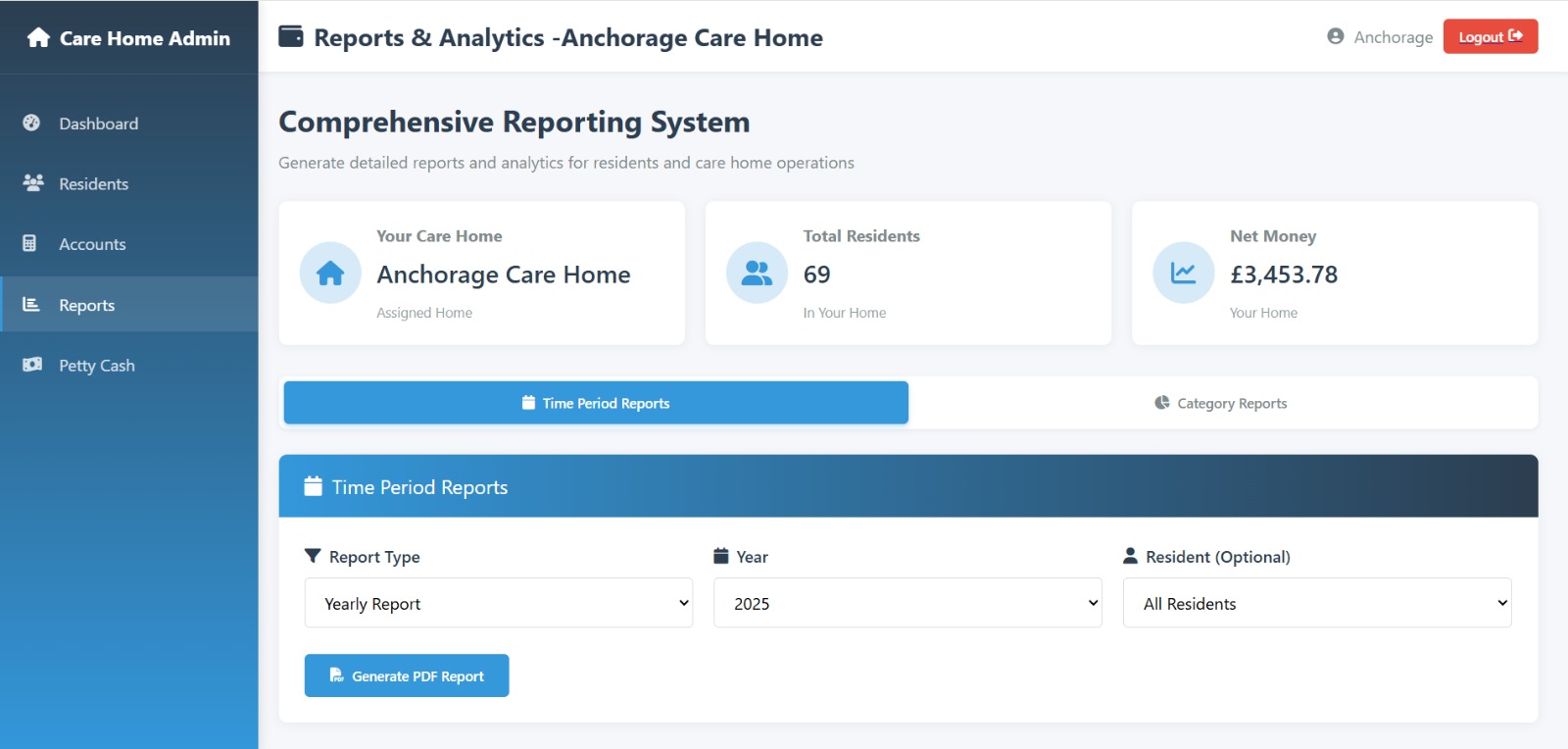
🧭 Reports & Analytics Overview
- Total Care Homes 🏠: 6 homes in the system
- Total Residents 👤: 39 residents across all homes
- Total Balance 💰: £11,489.27 (all homes combined)
1️⃣ Time Period Reports 📅
Purpose: Analyze financial performance over a specific timeframe.
- Select Report Type 📊 – Yearly, Monthly, Quarterly, etc. (currently Yearly Report selected).
- Apply Filters ⚙️ – Choose Year (e.g., 2025) and optionally a Resident.
- Generate Report 🖨️ – Click Generate PDF Report to produce the report.
Example: Yearly Report 2025 – Anchorage Care Home
- Resident List 👤 – Names and room numbers.
- Monthly Financial Breakdown 📈 – Monthly totals for Income, Expenses, Drops, and Net Balance.
- Transaction Details 🗂️ – Lists all transactions for the year (may show “No transactions found” if none logged).
2️⃣ Category Reports 🗂️
Purpose: Focus on operational and combined data across homes, not just financial periods.
- Select Report Type 📊 – Care Home Report, Resident Details Report, Staff Report, etc. (currently Care Home Report selected).
- Generate Report 🖨️ – Click Generate PDF Report.
✅ Summary of Report Generation
- Navigate to Reports & Analytics (or click Generate Report from a module).
- Choose either Time Period Reports 📅 or Category Reports 🗂️.
- Select the Report Type and apply necessary Filters (Year, Resident, Care Home).
- Click Generate PDF Report 🖨️ to view or download the report.
Petty Cash — Step-by-Step Guide
💵 Petty Cash Management – Care Home
The Petty Cash module records and reconciles small daily cash transactions for the care home.
1. Petty Cash Dashboard Overview
- 📂 Navigate to Petty Cash: Click the Petty Cash tab in the sidebar of the Care Home Admin dashboard.
- 💰 View Available Balance: The current cash float is displayed in the blue bar (e.g., £0.00 Available Petty Cash).
- 📝 Review Transactions: The Recent Transactions table shows Type, Amount, Description, Staff, Transaction Date, Updated Date, Receipt.
- 🔎 Filter: Use Filter by Month to view transactions for a specific period.
2. Recording Income (Adding Money)
- ➕ Initiate: Click + Add Money above the Recent Transactions table.
- 📝 Enter Details: The Add Money pop-up appears:
- Amount to Add: Enter the cash amount being added
- Transaction Date: Defaults to today; change via calendar icon if needed
- Description (Optional): e.g., “Cash replenishment from Bank withdrawal”
- Upload Receipt (Optional): Click Choose File (Max 5MB)
- 💾 Submit: Click + Add Money to record the inflow and update the Available Balance.
3. Recording Expense (Expensing Money)
- ➕ Initiate: Click + Add Expense above the Recent Transactions table.
- 📝 Enter Details: The Add Expense pop-up appears:
- Available Balance: Displayed for reference
- Amount to Use: Enter the cash spent
- Transaction Date: Defaults to today; can be changed
- Description: e.g., “Emergency batteries for clock”
- Upload Receipt (Optional): Click Choose File (Max 5MB)
- 💸 Submit: Click — Expense Money to record the outflow and update the Available Balance.
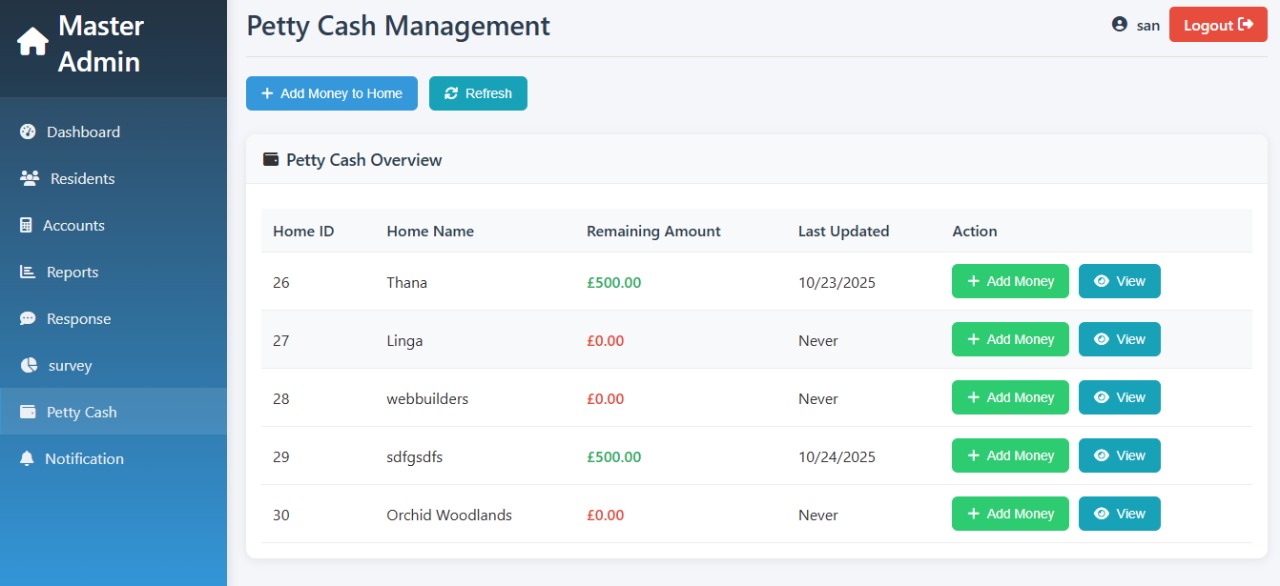
💷 Petty Cash Management
Manage petty cash balances for all care homes:
Step 1: 🏠 View Petty Cash Table
- Home Name 📋: Lists all care homes (e.g., WEB Care, Orchid Woodlands).
- Remaining Amount 💰: Shows current petty cash balance for each home.
- Last Updated ⏰: Date/time when balance was last changed.
- Actions:
- + Add Money ➕ (Green Button) – Top up or add funds.
- View 🔵 (Blue Button) – See past petty cash transactions for the home.
Step 2: ➕ Add Money to Petty Cash (Single Home)
- Click the + Add Money button for a specific home (e.g., WEB Care).
- Fill in the form:
- Home Name 🏠: Already selected.
- Amount to Add 💵: Enter cash being added (e.g., 200.00).
- Transaction Date 📅: Date of top-up (e.g., 22/11/2025).
- Description ✏️ (Optional): Brief note (e.g., "Weekly Petty Cash Float Top-up").
- Receipt 📎 (Optional): Upload supporting document if available.
- Click Add Money (Blue Button) to complete the top-up.
Step 3: ➕ Add Money Across Homes
- Click the main + Add Money to Home button at the top of the page.
- Select Home 🏠 – Choose the care home from the dropdown list.
- Proceed to the same Add Money form as above.
Step 4: ⚠️ Important Notes
Adding money to petty cash is usually recorded as a Transfer or a specific Expense in the main Accounts Management system.
This reflects money moving from the main Bank Account to the Cash Account.